Embedded Devices
The Display is equipped with several embedded devices, which add multiple functionalities. This section describes each of those embedded devices.
Buzzer
Section titled “Buzzer”The Display comes with a programmable buzzer. It is typically used to sound-notify the user of any system fault or warning. The buzzer can be configured via C++ code or from the terminal.
Enter the following commands to configure the buzzer from the terminal:
$ echo 0 > /sys/class/pwm/pwmchip1/export$ echo 1000000 > /sys/class/pwm/pwmchip1/pwm0/period$ echo 500000 > /sys/class/pwm/pwmchip1/pwm0/duty_cycle$ echo 1 > /sys/class/pwm/pwmchip1/pwm0/enable # Turn buzzer on$ echo 0 > /sys/class/pwm/pwmchip1/pwm0/enable # Turn buzzer offThe values are in nano seconds, So 1000000=1msec ==> 1KHz.
Use the following code to configure the buzzer in the Reference App via C++:
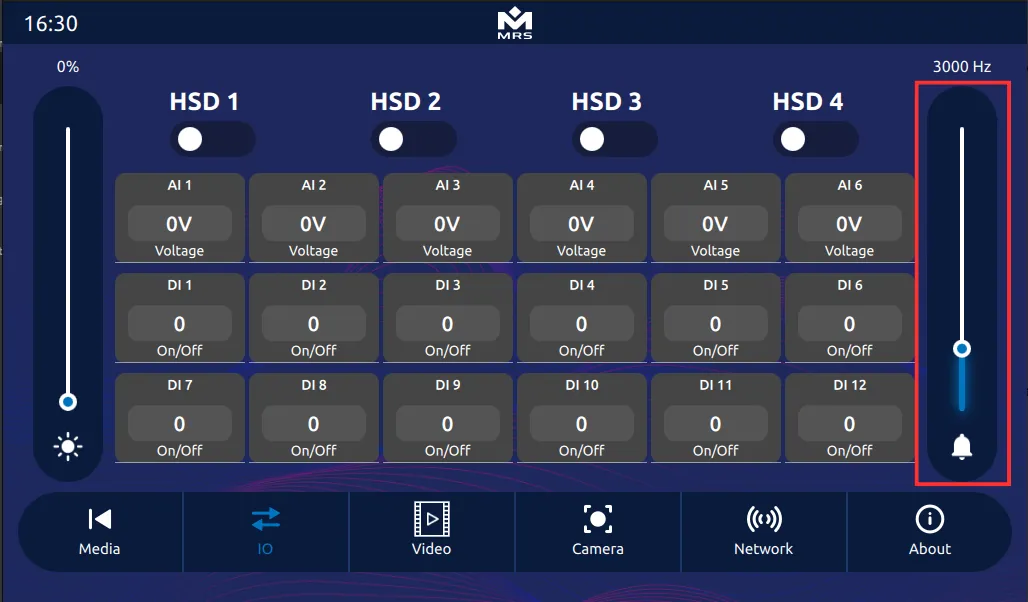
io = new digital_io();io->set_buzzer_freq(frequency)io->set_buzzer(true); // Turn buzzer onio->set_buzzer(false); // Turn buzzer offTo control the volume of the buzzer from the Reference App, use the slide bar on the right side:
If a further frequency and notification sound are required, use the device’s audio output, which can play any MP3 or WAV file.
Coprocessor
Section titled “Coprocessor”The MConn Display has a coprocessor that performs multiple functions, including the following:
- Reads analog inputs.
- Serves as a watchdog to ensure that the main processor does not lock up.
- Keeps the main processor alive when the ignition signal goes low, and it can be done by turning on KEEP_ALIVE output on coprocessor. It allows shutting down of the main processor in a delayed and controlled manner.
- Sends/Receives messages on the CAN bus.
- Asserts specific commands/data on CAN bus immediately at power on. The main display can take at least 5 seconds to boot. Whereas the coprocessor is instant-on and can perform CAN functions at startup if necessary. Contact MRS Electronic for more details.
- Holds a CAN bootloader and can be reprogrammed through the CAN bus.