Camera
Introduction
Section titled “Introduction”The Camera module within the Reference app offers features to showcase real-time streaming from RTSP, UDP, and analog cameras. Additionally, it facilitates the recording of streaming content. This functionality is implemented through the utilization of two classes.
Camera_C: This class generates aGStreamerpipeline to capture streams from the specified camera, whether it be an RTSP, analog, or UDP camera. It also extracts video frames from the stream.Camera_Cis exposed to the front end as qmlRegisterType by the name Camera.CameraViewItem_C: This class is linked to the Camera Class through theimageChangedsignal. It receives frames from theCameraClass and renders them usingQSGNode.Camera_Cis exposed to the front end asqmlRegisterTypeby the name ofCameraPlayer.
Analog Camera
Section titled “Analog Camera”MConn supports up to four analog cameras simultaneously. The signals from these cameras are routed through an internal ADC (Analog-to-Digital Converter). Each of these cameras is represented as a device file in the system, accessible at paths:
1. /dev/video02. /dev/video13. /dev/video24. /dev/video3It’s worth noting that /dev/video0 corresponds to Video1+ and Video1- signals, and the numbering follows sequentially order for subsequent cameras.
The following table describes the pin configuration on the mating connector:
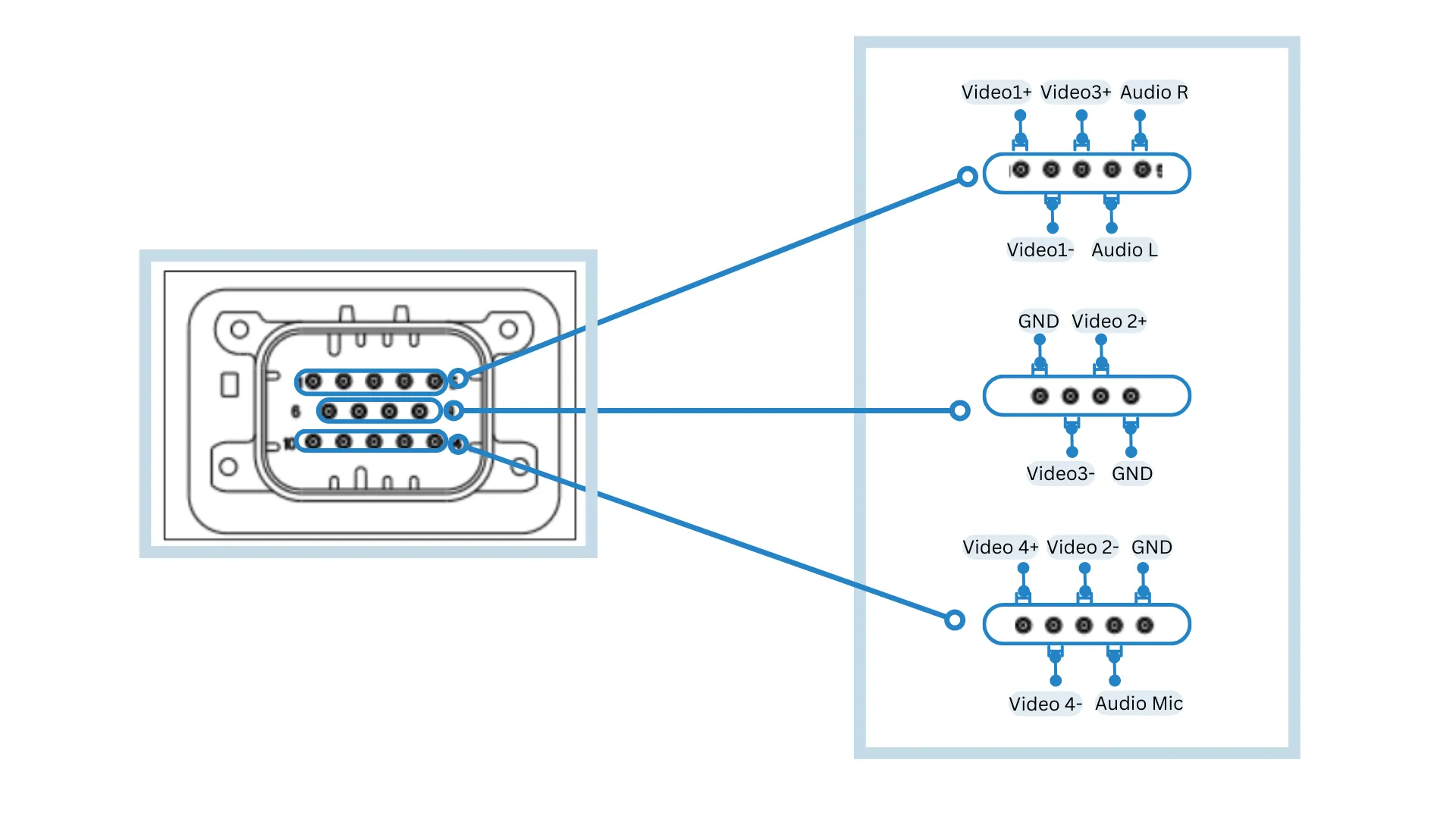
The following is the basic diagram for connecting analog camera to video1 (video0 in application). **[To Do] Add image here **
Camera_C (Camera in QML)
Section titled “Camera_C (Camera in QML)”For Analog we need to configure following Camera Q_PROPERTY in QML. To do so, follow the steps below:
type[Q_PROPERTY] (Required): For the analog cameratypeproperty, must be set to stringanalog.captureDevice[Q_PROPERTY] (Required): For analog cameras, the developer needs to specify the capture device from/dev/video0,/dev/video1,/dev/video2, or/dev/video3.startStream[Q_INVOKABLE function]: This function starts the camera’s stream.
Q_INVOKABLE void startStream();CameraViewItem_C (CameraPlayer in QML)
Section titled “CameraViewItem_C (CameraPlayer in QML)”For Analog we need to configure the following CameraPlayer Q_PROPERTY in QML:
source[Q_PROPERTY] (Required): Specify the identifier assigned to the camera in QML. This is essential for the Camera Player to establish a connection and receive frames from the analog camera, rendering them accordingly.
- Expose
Camera_CandCameraViewItem_Cto frontend asqmlRegisterType.
qmlRegisterType<CameraViewItem_C>("MRSComponents", 1, 0, "CameraPlayer");qmlRegisterType<Camera_C>("MRSComponents", 1, 0, "Camera");- For analog camera, use the following code:
// Create instance of camera set type to analog and in captureDevice specify analog camera device file, and upon component complete start streamCamera {        id: analogCamSrc2        type: "analog"        captureDevice: "/dev/video1"        Component.onCompleted: {            analogCamSrc2.startStream()        }    }// Note: Do not create multiple instance of Camera with same analog camera device file.
// Create instance of CameraPlayer that will render stream of camera, provide id of analog camera to its source field  CameraPlayer {        id: camera1        source: cameraList.analogCamSrc1        anchors.centerIn: parent        width: 550        height: 350        visible: true        // No need to initialize camera here since, camera are being initialize cameraList    }
Ethernet Camera
Section titled “Ethernet Camera”Currently, MConn supports two protocols for Ethernet cameras: “RTSP” and “UDP”.
The developer needs to specify the appropriate URL for these cameras, with further details provided in the following sections. For additional protocol support, developers can contact technical support at MRS Electronics for assistance.
RTSP Protocol
Section titled “RTSP Protocol”Camera_C (Camera in QML)
For Ethernet camera with RTSP protocol we need to configure following Camera Q_PROPERTY in QML:
type[Q_PROPERTY] (Required): For the RTSP camera “type” property, must be set to string “rtsp”.captureDevice[Q_PROPERTY] (Required): For the RTSP camera the developer must provide the full RTSP URL of the camera, including IP, port, and additional properties. Example: “rtsp://192.168.1.113:554/cam/realmonitor?channel=1&subtype=0&unicast=true&proto=Onvif.”userID[Q_PROPERTY] (Required for rtsp camera): Developer need to specify username for the rtsp camera.password[Q_PROPERTY] (Required for rtsp camera): Developer need to specify password for the rtsp camera.startStream[Q_INVOKABLE function]: This function is used to start the stream of camera.
Q_INVOKABLE void startStream();CameraViewItem_C (CameraPlayer in QML)
For RTSP we need to configure the following CameraPlayer Q_PROPERTY in QML:
source[Q_PROPERTY] (Required): Specify the identifier assigned to the camera in QML. This is essential for the Camera Player to establish a connection and receive frames from the RTSP camera, rendering them accordingly.
Usage:
//Create instance of camera set type to rtsp and in captureDevice specify url for camera, and upon component complete start stream  Camera {        id: rtspEthernetCamSrc        type: "rtsp"        captureDevice: "rtsp://admin:admin123@192.168.1.113:554/cam/realmonitor?channel=1&subtype=0&unicast=true&proto=Onvif"        userID: "admin"        password: "admin123"        dynamicRecordingSaveLocation: "/rw_data"        recordingFileName: "cam1"        Component.onCompleted: {             rtspEthernetCamSrc.startStream()        }    }
// Create instance of CameraPlayer that will render stream of camera, provide id of rtsp camera to its source field      CameraPlayer {            id: camera5            source: rtspEthernetCamSrc            width: parent.width            height: parent.height            visible: true        }
UDP Protocol
Section titled “UDP Protocol”Camera_C (Camera in QML)
For Ethernet camera with UDP protocol we need to configure following Camera Q_PROPERTY in QML:
type[Q_PROPERTY] (Required): For the UDP camera “type” property, must be set to string “udp”.captureDevice[Q_PROPERTY] (Required): For the UDP camera developer needs to specify the port of the UDP camera in this field.
CameraViewItem_C (CameraPlayer in QML)
For UDP, the developer needs to configure the following CameraPlayer Q_PROPERTY in QML:
source[Q_PROPERTY] (Required): Specify the identifier assigned to the camera in QML. This is essential for the Camera Player to establish a connection and receive frames from the UDP camera, rendering them accordingly.
Usage:
//Create instance of camera set type to udp and in captureDevice specify port for camera, and upon component complete start stream  Camera {        id: udpEthernetCamSrc        type: "udp"        captureDevice: "5014"        dynamicRecordingSaveLocation: "/rw_data"        recordingFileName: "cam1"    }
// Create instance of CameraPlayer that will render stream of camera, provide id of udp camera to its source field      CameraPlayer {            id: camera5            source:udpEthernetCamSrc            width: parent.width            height: parent.height            visible: true        }